
FFIEC APR Calculator: Your 2026 Compliance Guide
Master the FFIEC APR calculator with our 2026 guide. Learn inputs, examples, pitfalls, and TILA compliance verification for accurate calculations.
You're usually not opening the FFIEC APR calculator because everything is going smoothly. You open it when a disclosure looks close, but “close” isn't good enough. A fee was reclassified. The first payment date shifted. The payment stream has one irregular period. Someone wants to know whether the disclosed APR still holds.
That's the right time to use the FFIEC APR Calculator. Not to create the loan. Not to guess. To verify what's already on paper and decide whether the disclosure can stand.
A lot of confusion comes from treating the calculator like a lending platform feature. It isn't. Used correctly, it's a compliance control. Used carelessly, it gives a false sense of security because the math only reflects the data you feed it.
Why the FFIEC APR Calculator is Essential
When a loan file is moving toward closing, APR verification is one of those tasks that can look routine until it suddenly isn't. An odd first period, a prepaid charge, or a real estate-secured structure can turn a simple check into a real compliance question. That's why the FFIEC tool matters. It gives institutions a standardized federal method to verify disclosed APRs and finance charges instead of relying only on internal spreadsheets or vendor outputs.
The federal release announcing the tool matters for another reason. The FFIEC APR Computational Tool was announced on April 16, 2020, and it was built by FFIEC member agencies to help verify finance charges and APRs under the Truth in Lending Act and Regulation Z. It supports unsecured and secured installment loans, construction loans, real estate-secured loans, and checks for MAPR limits under the Military Lending Act, as described in the FFIEC Federal Disclosure Computational Tools announcement.
Why this matters in daily compliance work
That scope tells you something important. This isn't a niche calculator for one product type. It's a federal verification utility intended for the same general compliance environment examiners work in.
If you're new to APR testing, don't confuse conceptual learning with compliance verification. A consumer explainer such as this guide to APR vs APY calculators can help with terminology, but the FFIEC tool serves a different purpose. It checks whether your disclosed loan terms hold up under regulatory calculation logic.
Practical rule: If a loan disclosure is going out the door, a second calculation source is a control. If the file is complex, that control stops being optional.
What makes it essential
- It's official: The tool was built by FFIEC member agencies for examiner and institution use, not as an informal workaround.
- It fits examination logic: Teams can validate disclosures using the same category of federal utility that supports review work.
- It handles real-world loan structures: Installment, construction, and real estate-secured loans all fall within the stated scope.
- It supports MAPR checking for applicable installment loans: That matters when military lending issues sit alongside TILA analysis.
A junior analyst often asks whether the calculator is “required.” The better question is whether your process is defensible without an independent verification step. In straightforward files, internal systems may be right. In messy files, confidence without verification is where avoidable errors start.
A Verification Tool Not an Origination System
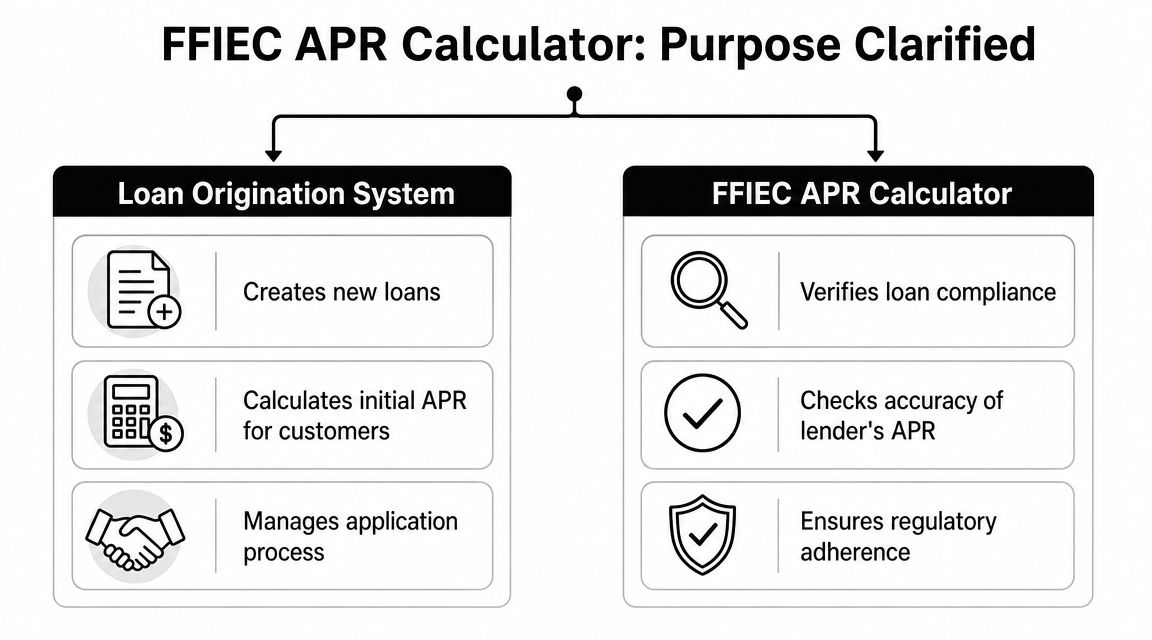
The most common mistake is using the FFIEC APR calculator as if it were a loan origination system. That's not what it does. It doesn't build a loan, manage an application, or generate production disclosures for borrowers. Its job is narrower and more useful: verify whether the disclosed APR and finance charge align with the actual contract terms you entered.
What the tool is doing
In practice, the workflow is simple. You take the loan terms from the contract or closing statement, enter them into the calculator, and compare the tool's output to the disclosed figures. That makes it a control layer.
That distinction affects who should use it and when:
- Before closing review: to confirm the disclosure package is still accurate after late changes
- In post-closing quality control: to test files selected for compliance review
- During issue remediation: to isolate whether the problem is math, fee treatment, or payment structure
- For examiner readiness: to show a repeatable verification process rather than ad hoc checking
What it is not doing
A loan origination system has a very different role. It captures borrower data, applies product logic, calculates proposed terms, produces workflow outputs, and pushes a file through operations. The FFIEC tool doesn't replace any of that.
If you enter estimated data, outdated fees, or a payment schedule that doesn't match the note, the calculator will still give you an answer. It just won't be the answer you need.
That's why people get into trouble when they call it a “calculator” and stop there. The name sounds general. The compliance use is specific.
The APRWIN change that still affects workflow
A lot of institutions still have process habits from older desktop tools. The OCC confirmed that APRWIN and APYWIN were discontinued in favor of the FFIEC Federal Disclosure Computational Tools, and the old Windows programs are no longer available, according to OCC Bulletin 2020-40.
That change wasn't just cosmetic. It moved many teams from a legacy desktop workflow to a web-based federal utility. If your department once relied on APRWIN screenshots, saved local files, or analyst-specific habits, your procedures had to change.
A workable modern approach usually includes:
| Workflow Area | What Works | What Doesn't |
|---|---|---|
| Input preparation | Pull terms from final executed documents | Keying from memory or preliminary drafts |
| Verification timing | Run after all fees and payment terms are settled | Running too early and assuming nothing changed |
| Documentation | Save the result with notes on assumptions used | Keeping only a verbal sign-off |
| Escalation | Flag variances for compliance review | Letting operations “fix later” without analysis |
Start tracking smart money today
Join thousands of traders using WalletFinder.ai to find profitable wallets and copy their trades.
Start Free Trial →

