
How to Track Wallets on Solana: A Step-by-Step Guide
Learn how to track Solana wallets effectively. Monitor trades, set alerts, and uncover smart money moves using WalletFinder.ai tools.
Have you ever wondered what top Solana traders are doing? Who is making the biggest profits? What tokens are whales buying before they pump?
The good news is that you can track all of it.
That is because the Solana blockchain is entirely public, from every transaction to each trade to wallet balances: it can be seen by anyone in the world. Whether you are an investor eager to learn some smart money moves or just want to track your assets, tracking Solana wallets puts you at a huge advantage in the crypto market.
Furthermore, among the tools that can facilitate this are Wallet Finder.ai, which makes it super fast and easy.
Below, we will learn how to track Solana wallets step by step, from finding wallet addresses to setting up alerts. Let's dive in.
What Can You Track in a Solana Wallet?
Knowing how to track wallets on Solana gives you deeper insight into a wallet’s activities, trades, and the general movements of the market. It involves checking your digital wallet to follow whale wallets, and understanding transaction details helps you make informed decisions.
Here is what you can track when analyzing a Solana wallet:
Transaction History
Every wallet transaction log provides a precise record of all activity, including tokens sent, received, and swapped. By studying these logs, you can evaluate trading volumes, deposits, and withdrawals to better understand market trends. This approach shows exactly how to use wallet analytics to track DeFi market movements, offering insights into liquidity patterns, token activity, and the overall health of the decentralized finance ecosystem.
With WalletFinder.ai, you can view each wallet’s realized trades and historical transaction data such as timestamps, amounts, and tokens involved, helping you understand its trading behavior over various timeframes.
NFT Holdings
If a wallet owns NFTs, you can view them via blockchain explorers such as Solana Explorer. Wallet Finder.ai principally aims to demonstrate realized trades and analytics for wallet activities, so once again, Solana explorer or other similar tools still remain your best bet with real-time NFT holdings.
DeFi Activity
Many traders use DeFi platforms, pools or staking services. Tracking on-chain activity reveals which wallets are supplying liquidity or staking, although some centralized staking rewards may not appear on-chain.
Swaps & Trades
Keeping track of swaps and trades gives an understanding of the current trading mode and market sentiment. A lot of wallets trade tokens across decentralized exchanges like Jupiter, Orca, or Raydium. Observing their transactions can add a lot of insight into price action.
Airdrops
Some wallets receive free tokens from projects looking to increase adoption.
Following the wallet's addresses lets you check which wallets get airdropped and how they act, whether they hold the airdropped token or sell it immediately.
Understanding these key points improves crypto investment strategy, especially in conjunction with using analysis tools like Wallet Finder.ai for effective wallet tracking.
How to Track a Solana Wallet: Step-by-Step Guide
Learning how to track wallets on Solana doesn’t have to be complicated. With platforms like Wallet Finder.ai, you can easily monitor wallet activities, analyze trades, and stay aware of market trends.
Here is a quite easy step-by-step guide to tracking wallets on Solana:
Step 1: Get the Wallet Address
To begin, you will need the public wallet address—a long string of characters unique to each wallet. It looks something like this:
8hJGt7FpZzqC6TjErM7H8X6gWYBAPpTzN9RgnJ3GztLt
Access this address for wallet activities, including transaction history and token holdings, without the knowledge of the wallet's private keys.
How to find a wallet address?
● If tracking your own wallet:
Open your crypto wallet app (Phantom, Solflare, or whatever else supports Solana). Go into the wallet area and click "Receive" to copy your address.
● If tracking someone else’s wallet:
Find public wallet addresses in different ways:
● Use a blockchain explorer like Solana Explorer or Solscan and search for known wallets.
● Copy the address from leaderboard public on analytical platforms.
● Look for addresses shared by crypto traders on social media or community forums.
And once you have it, you are ready to look for its transaction details, asset movement, or other trading activities.
Step 2: Use a Blockchain Explorer
Simply take the address and paste it into a blockchain explorer.
Tools like Solscan or Solana Explorer will show you detailed activities in wallets, such as transaction history, various balance shifts, and even network activities. However, while explorers provide basic data, they can be limited regarding advanced filtering and analytics.
Step 3: Track Trades & DeFi Activity
Solana’s network is popular for decentralized finance (DeFi).
Wallet interaction can basically tell you where a wallet is trading, staking, or providing liquidity. Wallet Finder.ai has made this journey easier by providing direct insights into the market movement so you can track trading strategies through various DeFi platforms without perusing raw blockchain data.
Step 4: Monitor Whale Wallets & Smart Money Moves
Tracking whale wallets—wallets containing a lot of SOL tokens or other assets offers very credible insights into market sentiment. Wallet Finder.ai allows you to track Solana wallet activities and see historical trades or realized profits in near real-time.
Step 5: Set Custom Alerts for Wallet Activity
Manual checking of wallets can be time-consuming.
Telegram alerts equip you to keep tracking wallet activities so you never miss an opportunity in the market without being glued to the platforms.
To turn on alerts, click on the little bell icon next to any wallet you'd like to follow from your chosen wallets list. Once activated, you will receive real-time notifications through Telegram when those wallets engage in particular activities. This keeps you updated so you can respond quickly to changes in the market or asset movements.
Here’s what you can get alerted for:
● New Trades - Be notified when a tracked wallet buys or sells tokens.
● Swaps and Transfers - Stay updated on token swaps or significant transfers.
● Large Transactions - Get alerts for high-value transactions that could signal market shifts.
You'd be well aware how these alerts for wallets increase proactivity in market condition analysis, smart money movement monitoring, and fine-tuning your crypto investment strategies. Wallet Finder.ai keeps you ahead in the cryptocurrency market by helping you make informed decisions based on correct data.
How Wallet Finder.ai Helps You Track Solana Wallets
Tracking wallets on Solana must seem tricky amidst the tons of data available, and this is where Wallet Finder.ai comes in for an easy, fast-and-simple-job.
Be it tracking whale wallets, analyzing your crypto wallet, or tracking trades for the betterment of your crypto investment strategy-Wallet Finder.ai has made the job reconciliable.
Here is how:
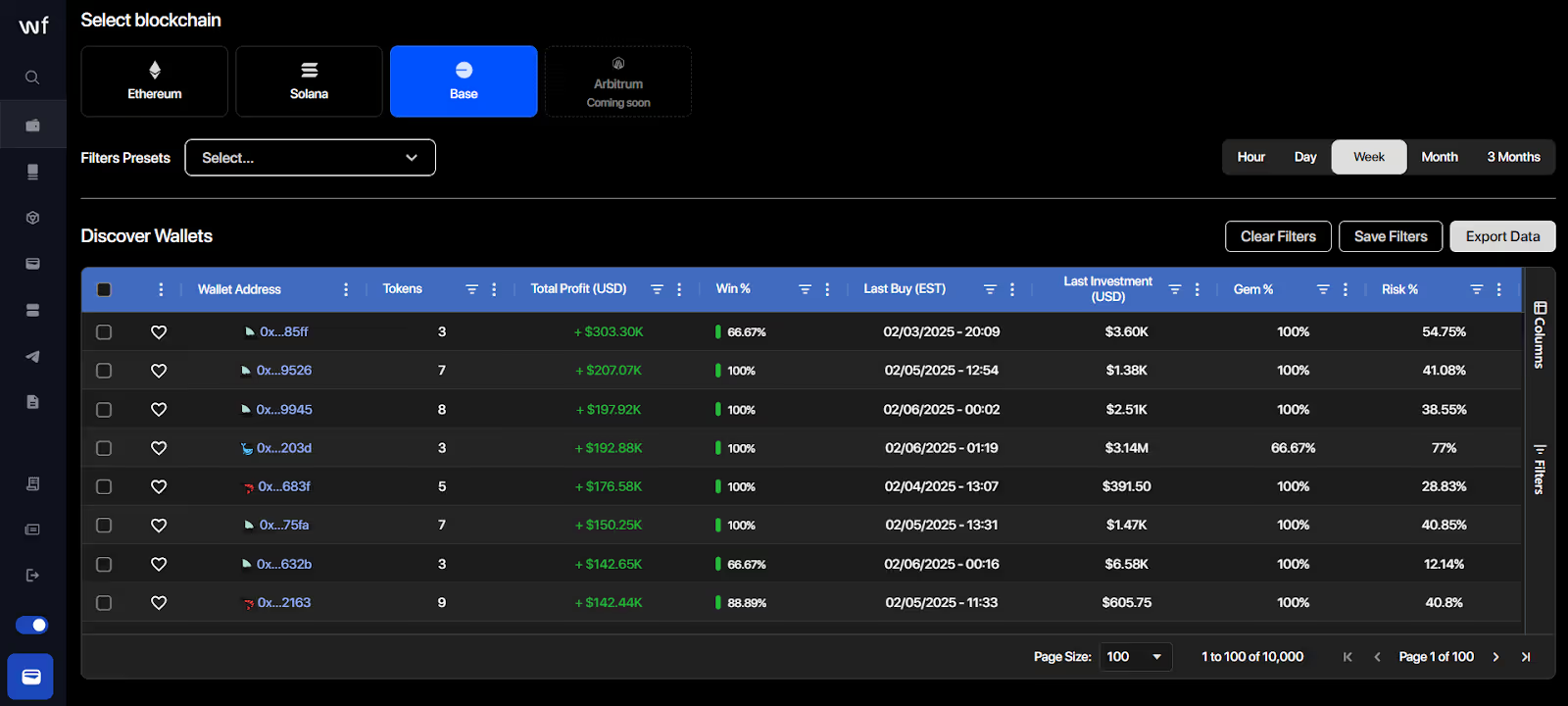
1. Real-Time Wallet Tracking
Start tracking smart money today
Join thousands of traders using WalletFinder.ai to find profitable wallets and copy their trades.
Start Free Trial →

